The easiest way to choose payroll software is to understand how pricing works on a per-employee basis. You just don’t have to think about salaries; there are things to consider as well, like taxes, benefits, PTO, workers’ compensation, and the software fees.
Most businesses purchase a monthly plan that also incurs a small per-employee fee. They pay a $20 to $180 monthly fee. Gusto and QuickBooks charge around $40 to $50, plus $6 to $8 per employee.
There is no ‘right’ solution, just a solution that works for you. That depends on your business size and your future needs. Comparing costs and understanding the hidden fees will help you decide which is the right payroll software for you. This article will explain Payroll Software Pricing Per Employee in detail. Read on.
Understanding Payroll Software Pricing Models
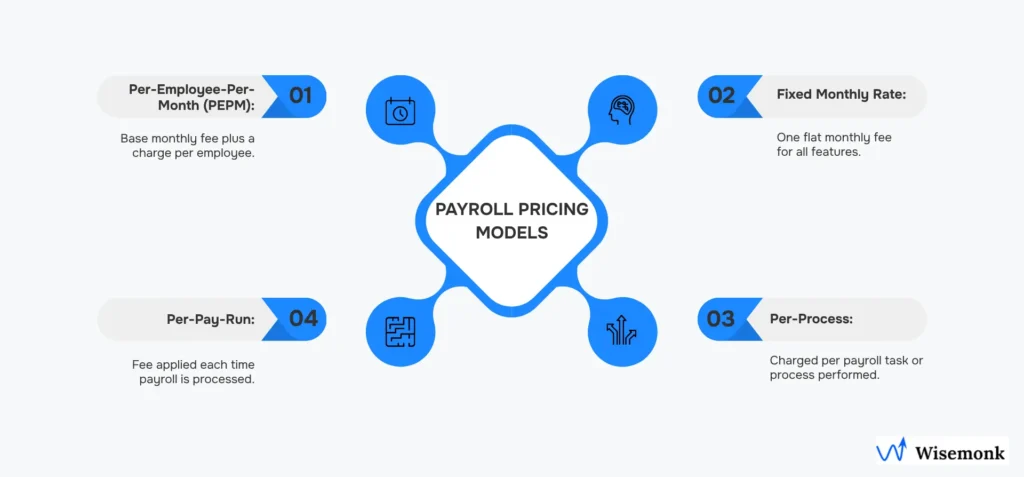
If you are trying to choose payroll software, getting familiar with how much different vendors charge would be a good start. It mostly comes down to two different pricing models: per-employee pricing and fixed or tiered subscriptions.
Per-Employee Pricing Explained
This payment model is pretty straightforward. You just have to pay a base fee and a small amount for each employee.
- Zoho Payroll: Charges you around $19/month + $3 per employee
- Gusto Core: Will charge you $39/month + $6 per employee
If you are a small business owner or just launching a start-up, then this is an ideal setup for you because you only pay for the staff you have. It can process your bonus. Automate your payroll calculations. Even manage PTO & bonuses. But advanced features like PTO tracking, workforce reporting & HR integrations might cost you more.
Other Common Pricing Models
There are some payroll software vendors out there that will offer you fixed monthly pricing, which doesn’t depend on the number of employees.
- Xero Payroll Starter: will charge you a flat fee of $22/month
- Sage Business Cloud Payroll: Will charge you an affordable £7/month for up to 5 employees
Mostly, these are tier plans. If you invest in a higher-tier plan. These plans will offer you features that can solve big problems for your business. These features include analytics, customer support & project tracking. Fixed pricing can be great because you know exactly what you are paying.
Then there are other pricing models, like quote-based or custom pricing. Mostly enterprise software like Paylocity, Oracle Payroll, and Paychex Flex Pro offer these plans. They mostly just give you a tailored price according to your business’s scope.
Factors That Affect Payroll Software Costs
If you are trying to choose payroll software, you must look beyond the apparent price tag and try to understand the factors that affect the overall cost of the software. Several such factors are stated below.
Features and Functionality
The more features a software has, the more it will cost you. Basic or free models will only handle wage calculation and direct deposits. Advanced software will automate your tax filings, invoicing, and expense tracking. Think of it as an investment in peace of mind, not just a software fee.
Number of Employees
Payroll software costs will increase as your business grows. Most software providers will charge you an additional amount per employee plus a base fee. For a small business owner, this can be a big deal. But if you run a large company, you might get a discount.
Additional Services
Some other lesser-known features can affect cost as well.
- Tax: Automateddeduction of federal, state, and local taxes can be heavy on your wallet.
- Direct Deposit: Direct deposits are mostly included in most payroll softwares however, in rare cases, the setup might cost extra.
- Onboarding and Offboarding: You might be charged if you add or remove employees from the system
Typical Payroll Software Pricing Per Employee Table
| Type of Payroll Software | Type of Pricing Model | Base Fee you will pay | Per Employee Fee you will pay | Notes and Features |
| Zoho Payroll | Per employee fee that you will have to pay | Its $19 per month | It’s $3 per employee | It offers features like Automatic payroll, time-off management, and bonus processing |
| Gusto Core | Per employee, you will have to pay | Its $39 per month | And $6 per employee | Its Ideal for small businesses. It includes basic HR features |
| QuickBooks Payroll | Per employee, you will have to pay | It costs between $40 and $50 per month | It’s between $6 and $8 per employee | It’s mostly Popular for accounting integration |
| Xero Payroll Starter | It offers Fixed and Tiered plans | It’s around $22 per month | N/A | It offers a Flat fee charge. It’s good for small teams |
| Sage Business Cloud Payroll | It offers Fixed and Tiered plans | It’s £7 per month. You can use it for up to 5 employees. | N/A | It’s only affordable for very small businesses |
| Paylocity | It offers quote-based and Custom pricing models | Varies | Varies | Enterprise solution, tailored pricing |
| Oracle Payroll | It offers quote-based and Custom pricing models | Varies | Varies | Enterprise solution, tailored pricing |
| Paychex Flex Pro | It offers quote-based and Custom pricing models | Varies | Varies | Enterprise solution, tailored pricing |
How to Choose the Right Payroll Software for Your Business
Put your business needs first:
- Divide your employees into a category list: salaried, hourly, contractors
- Plan your payroll frequency & the payment methods that you will use.
- Before investing in software, consider long term issue like scalability. Do not invest in software that has limited scalability options.
Integration with existing systems
- Choose payroll software that you can sync with accounting, HR, benefits, and expense management software.
- Utilize the cross-system automation to reduce manual errors like tax deductions
Key features you should look for
- Time tracking: The software should automatically import your hours, reduce errors, and handle overtime.
- Direct deposit: There should be no doubts and second-guessing. The software should be secure and convenient for salary payments for employees.
- Tax management: Accurate calculations, automatic updates, and filing support.
- Employee self-service: It should enable employees to access payslips, update personal info, and submit PTO requests.
- Paid Time Off (PTO) management: Your software should have accrual tracking, approval workflows, and transparency.
- Compensation management: The software should be divers it should support all salaried, hourly, commission-based, and contract workers.
- Payroll auditing & reporting: It should give you automatic Insights into labour costs, trends, and compliance.
- Automation: The whole point of paying for software is that it should reduce repetitive tasks like calculations, filings, and approvals.
Security and compliance
- Security is a must. Your software should come with Encryption (e.g., AES-256), multi-factor authentication, and access controls.
- It must have regular updates and audit trails to ensure your data’s protection.
- Your software should comply with labour laws, tax regulations, and record retention requirements to avoid any legal trouble.
Usability
- It shouldn’t be difficult to use the software. It should come with a Intuitive interface with minimal clicks and a clean layout.
- Mobile access is a must in today’s age for on-the-go payroll management.
- Simple employee portals to reduce errors and frustration.
Scalability
- Your software should have the ability to handle company growth, new locations, multiple employee types, and global payroll needs.
Double-Check Customer Support
- You should not only rely on one way of getting customer support. You should have various ways, such as phone, email, and live chat, as well as a knowledge base.
- You should also consider having built-in customer support within your software for setup and training.
Examine All Cost Factors
- The monthly fee for small plans should be about $20 to $100.
- The fee per employee should be about $2 to $15, as well as additional costs for premium features or integrations.
- You should consider all costs and compare them to the benefits of using the software before making a purchase.
Trials and Reviews
- You should not purchase any software without first trying it. Consider a free trial to see if it will work for you, such as if it will work for your payroll cycles, reporting, PTO, etc.
- You should also consider reviews from similar businesses to see if it will work well for you.
Long-Term Plans
- You should consider a software that will be able to expand with your business.
- You should consider a software that will be able to work for benefits, different types of pay, and even international if you need to
FAQs:
1. What does “per employee pricing” mean for payroll software?
“Per employee pricing” means you are charged a base fee, and then you are charged a small fee per employee. It’s great for small business owners because you are only charged for the number of employees you actually have. For instance, Gusto Core costs about $39 per month, and then there’s an extra charge of $6 per employee.
2. How is fixed pricing (tiered pricing) different from per employee pricing?
Unlike “per employee pricing,” fixed pricing, or tiered pricing, does not vary with the number of employees. You are charged one flat fee per month, and the fee may vary if you wish to have additional features. For example, Xero Payroll Starter costs one flat fee of $22 per month, regardless of the number of employees you have.
3. Are there other pricing options for payroll software?
Yes, there are other options for those with large enterprises, like Paylocity, Oracle Payroll, or Paychex Flex Pro. These charge what’s called “quote-based” pricing, where the actual cost of the software is determined by the number of employees in the business.
4. What factors influence the cost of payroll software?
Many factors influence the cost of payroll software:
- Features and tools: Additional features like automatic filing of taxes or the ability to integrate with an HR system will cost more.
- Number of employees: Payroll systems are often based on the number of employees. More employees mean more cost per employee.
- Additional services: Services like employee onboarding or offboarding, direct deposits, or automatic filing of taxes can cost more.
5. What are the essential features that payroll software should have?
Some of the essential features that payroll software should have are:
- Time tracking and calculation of overtime
- Direct deposit
- Automatic calculation and filing of taxes
- Employee self-service
- Calculation and management of PTO and other payroll issues
- Payroll auditing and reporting
- Automation of payroll
6. How can I ensure that the payroll software is secure and compliant?
Payroll software that is reliable will have robust security features like encryption and authentication. The payroll system will also ensure compliance with all relevant regulations like labor laws and tax regulations.
7. Is the cheapest payroll software the smartest choice?
While the answer to that is not necessarily true, it is important to note that the most expensive payroll software is not necessarily the best.
8. Does the payroll software scale with my business?
A good payroll software will scale with your business. Look for payroll solutions that can handle different kinds of employees, more offices, and international payroll if that is part of your growth strategy.
Conclusion
Look for the software that works best for your business. If you are a small business, a per-employee pricing plan could be great. However, don’t rule out flat fee and custom pricing solutions.
Consider factors like additional services, advanced features, integration capabilities, security, and scalability. And select software that streamlines payroll management. Remember, the smartest choice isn’t always the cheapest; it’s the solution that saves you time and grows alongside your business.